> ## Documentation Index
> Fetch the complete documentation index at: https://discord-anthony-embed-unfurl-components.mintlify.site/llms.txt
> Use this file to discover all available pages before exploring further.
# Link Previews
> Control how links to your website look when they are shared in Discord.
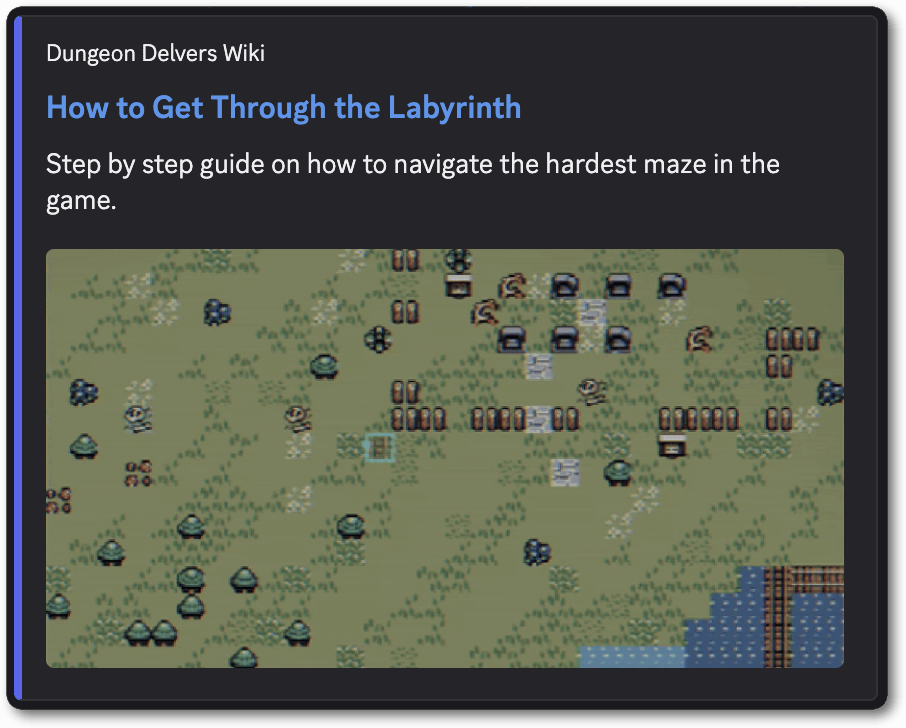
A link preview or embed is what shows up in Discord when a link to your website is pasted into a chat. If you've ever seen a card pop up with your site name, the page title, a couple of lines of description, an accent color, and an image or a video player, that is a link preview. Discord builds that card by fetching the page and reading the metadata in its HTML, and the process of building it is called unfurling.
If you want a preview that goes past a title, description, and image, [Component Embeds](/developers/link-previews/component-embeds) let you build a fully custom layout out of [Discord components](/developers/components/overview). The rest of this page covers the standard preview.
Link previews are subject to change.
***
## Quick Start
Drop this into the `` of a page and you get a preview with your site name, a linked title, a description, an accent color, and a large image below the text.
```html theme={"system"}
```
 ***
## How Discord Reads Your Page
Discord makes a single `GET` request for the URL that was shared and parses the HTML that comes back. Your page has to meet all of the following for a preview to appear.
| Requirement | Detail |
| ------------ | ---------------------------------------------------------------------------------------------------------------------------------------------- |
| Server-side | The tags must be in the HTML your server sends. No JavaScript is executed, so tags added by a client-side framework after load are never seen. |
| Status | The response must be a 2xx. |
| Content type | `text/html` or `application/xhtml+xml`, and not served as a download with `Content-Disposition: attachment`. |
| Scheme | `http` or `https`, on a host reachable from the public internet. |
| Redirects | At most 5. |
| Size | At most 50 MB. |
| Time | The whole fetch, including measuring your images and video, must finish within 10 seconds. |
### Let the Crawler Through
The crawler identifies itself with this User-Agent:
```
Mozilla/5.0 (compatible; Discordbot/2.0; +https://discordapp.com)
```
If your site sits behind bot protection, a WAF, or a rate limiter, allow user agents containing `Discordbot`.
This is not the same User-Agent that API clients send. Apps calling the HTTP API identify themselves as `DiscordBot ($url, $versionNumber)`, described in the [API reference](/developers/reference#user-agent). Rules written against that string will not match the crawler.
***
## Tag Reference
For each tag:
* The key comes from `name` if present, otherwise from `property`.
* The value comes from `content` if present, otherwise from `value`.
* Key names are case-sensitive. `og:title` works, `OG:Title` does not.
* When several tags map to the same field, the first non-empty one wins for the title, description, and site name. For layout, color, and date tags, the last one in the document wins.
| Tag | Embed field | Notes |
| ------------------------------------------------------------------------------------------------------------- | ----------------------------------------------- | -------------------------------------------------------------------------------------------------------------------------- |
| `og:title`, `twitter:title` | title | |
| `og:description`, `twitter:description` | description | Plain text, unless `og:type` is `rich` then the text is rendered using Discord markdown. |
| `` plus `<meta name="description">` | title and description | Used only as a pair, and only when the page has neither an Open Graph or Twitter title nor a description. |
| `og:site_name` | provider name | Shown above the title. |
| `og:image`, `og:image:url`, `og:image:secure_url`, `twitter:image`, `twitter:image:src` | image or thumbnail | See [Images](/developers/link-previews/overview#images). |
| `og:image:width`, `og:image:height`, `twitter:image:width`, `twitter:image:height` | image dimensions | Apply to the most recent `og:image` or `twitter:image` tag above them. |
| `og:image:type` | image media type | Must be a supported format. See [Images](/developers/link-previews/overview#images). |
| `og:image:alt`, `twitter:image:alt` | image alt text | |
| `og:video`, `og:video:url`, `og:video:secure_url`, `twitter:player:stream` | video | See [Video](/developers/link-previews/overview#video). |
| `og:video:width`, `og:video:height`, `twitter:player:width`, `twitter:player:height`, `og:width`, `og:height` | video dimensions | Optional. Discord measures the video file itself. |
| `og:video:type`, `twitter:player:stream:content_type` | video media type | Only `video/mp4`, `video/webm`, and `video/quicktime`. |
| `og:type` | layout | Only `rich`, `video`, `video.*`, and `instapp:photo`. |
| `twitter:card` | layout | `player`, `summary_large_image`, and `photo` change the layout. |
| `theme-color` | accent color | `#RRGGBB` or `#RRGGBBAA` only. |
| `og:pubdate`, `pubdate`, `iso-8601-publish-date` | timestamp | Full RFC 3339, including time and offset. |
| JSON-LD `VideoObject` | title, description, video, thumbnail, timestamp | A top-level `schema.org` `VideoObject`. Discord reads `name`, `description`, `embedUrl`, `thumbnailUrl`, and `uploadDate`. |
| `<link type="application/json+oembed">` | oEmbed discovery | The first matching link is used. See [oEmbed](/developers/link-previews/overview#oembed). |
***
## Preview Layouts
The tags you set decide which layout a reader gets.
| What you set | What people see |
| ----------------------------------------------------------------------------------- | -------------------------------------------------------------------------------------------------------------------------- |
| Title, description, and one image, with no layout tags | Text with a small thumbnail to the right of it. This is the default. |
| `twitter:card` set to `summary_large_image` | Text with a large image below it. |
| `twitter:card` set to `photo`, or the shared URL points straight at an image file | The image on its own, with no description. |
| `og:type` set to `video.other` or `twitter:card` set to `player`, plus a video file | An inline video player using `og:image` as the poster frame, with no description. |
| Two or more `og:image` tags | A gallery of up to 4 images, in the large layout. |
| `og:type` set to `rich` | Text with a small thumbnail. The description renders as Discord markdown, and a video file plays inline if one is present. |
***
## Images
* Supported formats are PNG, GIF, JPEG, WebP, and AVIF.
* Provide `og:image:width` and `og:image:height`. Without them, Discord fetches the image to measure it, and if that fetch fails or runs past the time budget the image is dropped.
* Relative URLs must start with `/`. A bare `images/card.png` is not resolved.
* Dimension, type, and alt tags attach to `og:image` and `twitter:image` only. They are not read for `og:image:url`, `og:image:secure_url`, or `twitter:image:src`, so use the plain tag names when you want to declare dimensions.
* Two or more `og:image` tags produce a gallery. At most 4 images are shown.
* Sharing a URL that points straight at an image file produces an image preview with no metadata required. An animated GIF shared this way plays as an animated image.
***
## Video
A video plays inline when `og:video` points at a video file. Only the formats `.mp4`, `.webm`, or `.mov` are allowed. Point the tag at the file itself, not at a page that plays it. The following must also be true:
* Set `og:type` to `video.other` or `twitter:card` to `player`. Video tags are ignored on the default link layout.
* Set `og:image`. It becomes the poster frame and it is required to render the video.
* Serve the file over `https`. Video URLs are always loaded over `https`, so an `http` URL is rewritten.
* Discord measures the file to size the player, so `og:video:width` and `og:video:height` are optional. If the file cannot be measured and no dimensions are declared, the video is dropped and the layout falls back to a plain link preview.
```html theme={"system"}
<meta property="og:type" content="video.other">
<meta property="og:video" content="http://watchanimeattheoffice.com/videos/dungeon-delvers-content-update.mp4">
<meta property="og:video:type" content="video/mp4">
<meta property="og:video:width" content="1280">
<meta property="og:video:height" content="720">
<meta property="og:image" content="http://watchanimeattheoffice.com/videos/dungeon-delvers-content-update-still.png">
<meta property="og:image:width" content="1280">
<meta property="og:image:height" content="720">
```
***
## oEmbed
Discord supports oEmbed in JSON only, discovered through a link tag in your document:
```html theme={"system"}
<link type="application/json+oembed" href="http://watchanimeattheoffice.com/oembed?url=http://watchanimeattheoffice.com/labyrinth">
```
oEmbed runs after Open Graph, so most of its fields fill gaps rather than replacing what your `<meta>` tags already said. These fields are used:
| Field | Effect |
| ------------------------------------- | ---------------------------------------------------------------------------- |
| `title` | Sets the title, only if no Open Graph or Twitter title was found. |
| `thumbnail_url` | Sets the image, only if no Open Graph image was found. |
| `thumbnail_width`, `thumbnail_height` | Required alongside `thumbnail_url`. Without both, the thumbnail is not used. |
| `author_name`, `author_url` | Set the author line. oEmbed is the only way to put an author on a preview. |
| `provider_name`, `provider_url` | Override `og:site_name` and give the site name a link. |
| `type` | Sets the layout, only if no type was set by `og:type` or `twitter:card`. |
`html`, `url`, `width`, `height`, and `cache_age` are ignored. Errors fetching or parsing the oEmbed document are ignored too, so a broken endpoint costs you the oEmbed fields but leaves the rest of the preview intact.
```json theme={"system"}
{
"version": "1.0",
"type": "link",
"title": "Update to Dungeon Generation",
"author_name": "Anthony Tešija",
"author_url": "http://watchanimeattheoffice.com/developer/ant",
"provider_name": "Dungeon Delvers",
"provider_url": "http://watchanimeattheoffice.com",
"thumbnail_url": "http://watchanimeattheoffice.com/images/dungeon.png",
"thumbnail_width": 1200,
"thumbnail_height": 630
}
```
***
## Accent Color and Publish Date
`theme-color` sets the accent color of the preview, and it has to be a 6 or 8 digit hex value:
```html theme={"system"}
<meta name="theme-color" content="#5865F2">
```
Three-digit shorthand such as `#58F`, CSS color names such as `rebeccapurple`, and `rgb()` notation are all ignored.
Publish dates have to be full RFC 3339 timestamps with a time and an offset:
```html theme={"system"}
<meta property="og:pubdate" content="2026-09-15T12:00:00Z">
```
A date on its own, such as `2026-09-15`, is not accepted.
***
## Limits
| Field | Limit | Over the limit |
| ----------------- | ------------------- | -------------------------- |
| Title | 70 bytes, 3 lines | Trimmed |
| Description | 350 bytes, 20 lines | Trimmed |
| `og:site_name` | 256 characters | No preview at all |
| Image alt text | 4,096 characters | No preview at all |
| Any URL | 2,048 characters | No preview at all |
| Images per link | 4 | Extra images are not shown |
| Links per message | 5 | Later links get no preview |
Titles and descriptions are trimmed to fit. An over-long site name, alt text, or URL causes the preview to not render at all.
<Info>
Title and description limits are counted in bytes, not characters.
</Info>
The description is shown as plain text, and HTML tags in it appear literally. On `og:type` `rich` previews the description is rendered as Discord markdown instead, so asterisks, underscores, and backticks will format the text.
***
## Caching and Testing
Discord caches previews for about 30 minutes. While a preview is cached, editing your tags and resharing the same URL shows the old card.
* To see changes immediately, share the URL with a new query string, such as `?v=2`.
* Changing only the `#fragment` does not work. Fragments are not part of the cache key.
* The [Embed Debugger](https://discord.com/developers/embeds) shows how Discord reads any URL, including which tags it picked up and which layout it chose.
***
## Troubleshooting
**No preview at all**
* Bot protection, a WAF, or a rate limiter blocked the request. Allow user agents containing `Discordbot`.
* The page returned a non-2xx status, or a content type other than `text/html` or `application/xhtml+xml`.
* Your tags are present but their `content` values are empty.
* `og:site_name`, image alt text, or a URL ran past its limit.
* The page produced nothing to show. A preview needs at least one of title, description, author, image, thumbnail, video, or site name.
* Your tags are injected by client-side JavaScript. Render them server-side instead.
**The image is missing**
* No `og:image:width` and `og:image:height`, and the image could not be fetched in time. Declare the dimensions.
* The image is in a format other than PNG, GIF, JPEG, WebP, or AVIF.
* The image URL is relative and does not start with `/`.
* You set dimensions on `og:image:url` or `og:image:secure_url` instead of `og:image`.
**The video does not play**
* `og:type` is not `video.other` and `twitter:card` is not `player`.
* There is no `og:image` poster.
* The URL is not a direct `.mp4`, `.webm`, or `.mov` file.
* The file could not be measured and has no `og:video:width` and `og:video:height`.
**The preview is stale**
* It is cached. Reshare with a new query string.
***
## Next Steps
<Card title="Component Embeds" href="/developers/link-previews/component-embeds">
Build a fully custom preview layout for your links out of Discord components.
</Card>
***
## How Discord Reads Your Page
Discord makes a single `GET` request for the URL that was shared and parses the HTML that comes back. Your page has to meet all of the following for a preview to appear.
| Requirement | Detail |
| ------------ | ---------------------------------------------------------------------------------------------------------------------------------------------- |
| Server-side | The tags must be in the HTML your server sends. No JavaScript is executed, so tags added by a client-side framework after load are never seen. |
| Status | The response must be a 2xx. |
| Content type | `text/html` or `application/xhtml+xml`, and not served as a download with `Content-Disposition: attachment`. |
| Scheme | `http` or `https`, on a host reachable from the public internet. |
| Redirects | At most 5. |
| Size | At most 50 MB. |
| Time | The whole fetch, including measuring your images and video, must finish within 10 seconds. |
### Let the Crawler Through
The crawler identifies itself with this User-Agent:
```
Mozilla/5.0 (compatible; Discordbot/2.0; +https://discordapp.com)
```
If your site sits behind bot protection, a WAF, or a rate limiter, allow user agents containing `Discordbot`.
This is not the same User-Agent that API clients send. Apps calling the HTTP API identify themselves as `DiscordBot ($url, $versionNumber)`, described in the [API reference](/developers/reference#user-agent). Rules written against that string will not match the crawler.
***
## Tag Reference
For each tag:
* The key comes from `name` if present, otherwise from `property`.
* The value comes from `content` if present, otherwise from `value`.
* Key names are case-sensitive. `og:title` works, `OG:Title` does not.
* When several tags map to the same field, the first non-empty one wins for the title, description, and site name. For layout, color, and date tags, the last one in the document wins.
| Tag | Embed field | Notes |
| ------------------------------------------------------------------------------------------------------------- | ----------------------------------------------- | -------------------------------------------------------------------------------------------------------------------------- |
| `og:title`, `twitter:title` | title | |
| `og:description`, `twitter:description` | description | Plain text, unless `og:type` is `rich` then the text is rendered using Discord markdown. |
| `` plus `<meta name="description">` | title and description | Used only as a pair, and only when the page has neither an Open Graph or Twitter title nor a description. |
| `og:site_name` | provider name | Shown above the title. |
| `og:image`, `og:image:url`, `og:image:secure_url`, `twitter:image`, `twitter:image:src` | image or thumbnail | See [Images](/developers/link-previews/overview#images). |
| `og:image:width`, `og:image:height`, `twitter:image:width`, `twitter:image:height` | image dimensions | Apply to the most recent `og:image` or `twitter:image` tag above them. |
| `og:image:type` | image media type | Must be a supported format. See [Images](/developers/link-previews/overview#images). |
| `og:image:alt`, `twitter:image:alt` | image alt text | |
| `og:video`, `og:video:url`, `og:video:secure_url`, `twitter:player:stream` | video | See [Video](/developers/link-previews/overview#video). |
| `og:video:width`, `og:video:height`, `twitter:player:width`, `twitter:player:height`, `og:width`, `og:height` | video dimensions | Optional. Discord measures the video file itself. |
| `og:video:type`, `twitter:player:stream:content_type` | video media type | Only `video/mp4`, `video/webm`, and `video/quicktime`. |
| `og:type` | layout | Only `rich`, `video`, `video.*`, and `instapp:photo`. |
| `twitter:card` | layout | `player`, `summary_large_image`, and `photo` change the layout. |
| `theme-color` | accent color | `#RRGGBB` or `#RRGGBBAA` only. |
| `og:pubdate`, `pubdate`, `iso-8601-publish-date` | timestamp | Full RFC 3339, including time and offset. |
| JSON-LD `VideoObject` | title, description, video, thumbnail, timestamp | A top-level `schema.org` `VideoObject`. Discord reads `name`, `description`, `embedUrl`, `thumbnailUrl`, and `uploadDate`. |
| `<link type="application/json+oembed">` | oEmbed discovery | The first matching link is used. See [oEmbed](/developers/link-previews/overview#oembed). |
***
## Preview Layouts
The tags you set decide which layout a reader gets.
| What you set | What people see |
| ----------------------------------------------------------------------------------- | -------------------------------------------------------------------------------------------------------------------------- |
| Title, description, and one image, with no layout tags | Text with a small thumbnail to the right of it. This is the default. |
| `twitter:card` set to `summary_large_image` | Text with a large image below it. |
| `twitter:card` set to `photo`, or the shared URL points straight at an image file | The image on its own, with no description. |
| `og:type` set to `video.other` or `twitter:card` set to `player`, plus a video file | An inline video player using `og:image` as the poster frame, with no description. |
| Two or more `og:image` tags | A gallery of up to 4 images, in the large layout. |
| `og:type` set to `rich` | Text with a small thumbnail. The description renders as Discord markdown, and a video file plays inline if one is present. |
***
## Images
* Supported formats are PNG, GIF, JPEG, WebP, and AVIF.
* Provide `og:image:width` and `og:image:height`. Without them, Discord fetches the image to measure it, and if that fetch fails or runs past the time budget the image is dropped.
* Relative URLs must start with `/`. A bare `images/card.png` is not resolved.
* Dimension, type, and alt tags attach to `og:image` and `twitter:image` only. They are not read for `og:image:url`, `og:image:secure_url`, or `twitter:image:src`, so use the plain tag names when you want to declare dimensions.
* Two or more `og:image` tags produce a gallery. At most 4 images are shown.
* Sharing a URL that points straight at an image file produces an image preview with no metadata required. An animated GIF shared this way plays as an animated image.
***
## Video
A video plays inline when `og:video` points at a video file. Only the formats `.mp4`, `.webm`, or `.mov` are allowed. Point the tag at the file itself, not at a page that plays it. The following must also be true:
* Set `og:type` to `video.other` or `twitter:card` to `player`. Video tags are ignored on the default link layout.
* Set `og:image`. It becomes the poster frame and it is required to render the video.
* Serve the file over `https`. Video URLs are always loaded over `https`, so an `http` URL is rewritten.
* Discord measures the file to size the player, so `og:video:width` and `og:video:height` are optional. If the file cannot be measured and no dimensions are declared, the video is dropped and the layout falls back to a plain link preview.
```html theme={"system"}
<meta property="og:type" content="video.other">
<meta property="og:video" content="http://watchanimeattheoffice.com/videos/dungeon-delvers-content-update.mp4">
<meta property="og:video:type" content="video/mp4">
<meta property="og:video:width" content="1280">
<meta property="og:video:height" content="720">
<meta property="og:image" content="http://watchanimeattheoffice.com/videos/dungeon-delvers-content-update-still.png">
<meta property="og:image:width" content="1280">
<meta property="og:image:height" content="720">
```
***
## oEmbed
Discord supports oEmbed in JSON only, discovered through a link tag in your document:
```html theme={"system"}
<link type="application/json+oembed" href="http://watchanimeattheoffice.com/oembed?url=http://watchanimeattheoffice.com/labyrinth">
```
oEmbed runs after Open Graph, so most of its fields fill gaps rather than replacing what your `<meta>` tags already said. These fields are used:
| Field | Effect |
| ------------------------------------- | ---------------------------------------------------------------------------- |
| `title` | Sets the title, only if no Open Graph or Twitter title was found. |
| `thumbnail_url` | Sets the image, only if no Open Graph image was found. |
| `thumbnail_width`, `thumbnail_height` | Required alongside `thumbnail_url`. Without both, the thumbnail is not used. |
| `author_name`, `author_url` | Set the author line. oEmbed is the only way to put an author on a preview. |
| `provider_name`, `provider_url` | Override `og:site_name` and give the site name a link. |
| `type` | Sets the layout, only if no type was set by `og:type` or `twitter:card`. |
`html`, `url`, `width`, `height`, and `cache_age` are ignored. Errors fetching or parsing the oEmbed document are ignored too, so a broken endpoint costs you the oEmbed fields but leaves the rest of the preview intact.
```json theme={"system"}
{
"version": "1.0",
"type": "link",
"title": "Update to Dungeon Generation",
"author_name": "Anthony Tešija",
"author_url": "http://watchanimeattheoffice.com/developer/ant",
"provider_name": "Dungeon Delvers",
"provider_url": "http://watchanimeattheoffice.com",
"thumbnail_url": "http://watchanimeattheoffice.com/images/dungeon.png",
"thumbnail_width": 1200,
"thumbnail_height": 630
}
```
***
## Accent Color and Publish Date
`theme-color` sets the accent color of the preview, and it has to be a 6 or 8 digit hex value:
```html theme={"system"}
<meta name="theme-color" content="#5865F2">
```
Three-digit shorthand such as `#58F`, CSS color names such as `rebeccapurple`, and `rgb()` notation are all ignored.
Publish dates have to be full RFC 3339 timestamps with a time and an offset:
```html theme={"system"}
<meta property="og:pubdate" content="2026-09-15T12:00:00Z">
```
A date on its own, such as `2026-09-15`, is not accepted.
***
## Limits
| Field | Limit | Over the limit |
| ----------------- | ------------------- | -------------------------- |
| Title | 70 bytes, 3 lines | Trimmed |
| Description | 350 bytes, 20 lines | Trimmed |
| `og:site_name` | 256 characters | No preview at all |
| Image alt text | 4,096 characters | No preview at all |
| Any URL | 2,048 characters | No preview at all |
| Images per link | 4 | Extra images are not shown |
| Links per message | 5 | Later links get no preview |
Titles and descriptions are trimmed to fit. An over-long site name, alt text, or URL causes the preview to not render at all.
<Info>
Title and description limits are counted in bytes, not characters.
</Info>
The description is shown as plain text, and HTML tags in it appear literally. On `og:type` `rich` previews the description is rendered as Discord markdown instead, so asterisks, underscores, and backticks will format the text.
***
## Caching and Testing
Discord caches previews for about 30 minutes. While a preview is cached, editing your tags and resharing the same URL shows the old card.
* To see changes immediately, share the URL with a new query string, such as `?v=2`.
* Changing only the `#fragment` does not work. Fragments are not part of the cache key.
* The [Embed Debugger](https://discord.com/developers/embeds) shows how Discord reads any URL, including which tags it picked up and which layout it chose.
***
## Troubleshooting
**No preview at all**
* Bot protection, a WAF, or a rate limiter blocked the request. Allow user agents containing `Discordbot`.
* The page returned a non-2xx status, or a content type other than `text/html` or `application/xhtml+xml`.
* Your tags are present but their `content` values are empty.
* `og:site_name`, image alt text, or a URL ran past its limit.
* The page produced nothing to show. A preview needs at least one of title, description, author, image, thumbnail, video, or site name.
* Your tags are injected by client-side JavaScript. Render them server-side instead.
**The image is missing**
* No `og:image:width` and `og:image:height`, and the image could not be fetched in time. Declare the dimensions.
* The image is in a format other than PNG, GIF, JPEG, WebP, or AVIF.
* The image URL is relative and does not start with `/`.
* You set dimensions on `og:image:url` or `og:image:secure_url` instead of `og:image`.
**The video does not play**
* `og:type` is not `video.other` and `twitter:card` is not `player`.
* There is no `og:image` poster.
* The URL is not a direct `.mp4`, `.webm`, or `.mov` file.
* The file could not be measured and has no `og:video:width` and `og:video:height`.
**The preview is stale**
* It is cached. Reshare with a new query string.
***
## Next Steps
<Card title="Component Embeds" href="/developers/link-previews/component-embeds">
Build a fully custom preview layout for your links out of Discord components.
</Card>